AI Sales Prospecting Automation: My Overnight Workflow, Step by Step
AI sales prospecting automation that keeps quality high: the workflow that runs overnight, the tools I use, and my real open and reply rates.

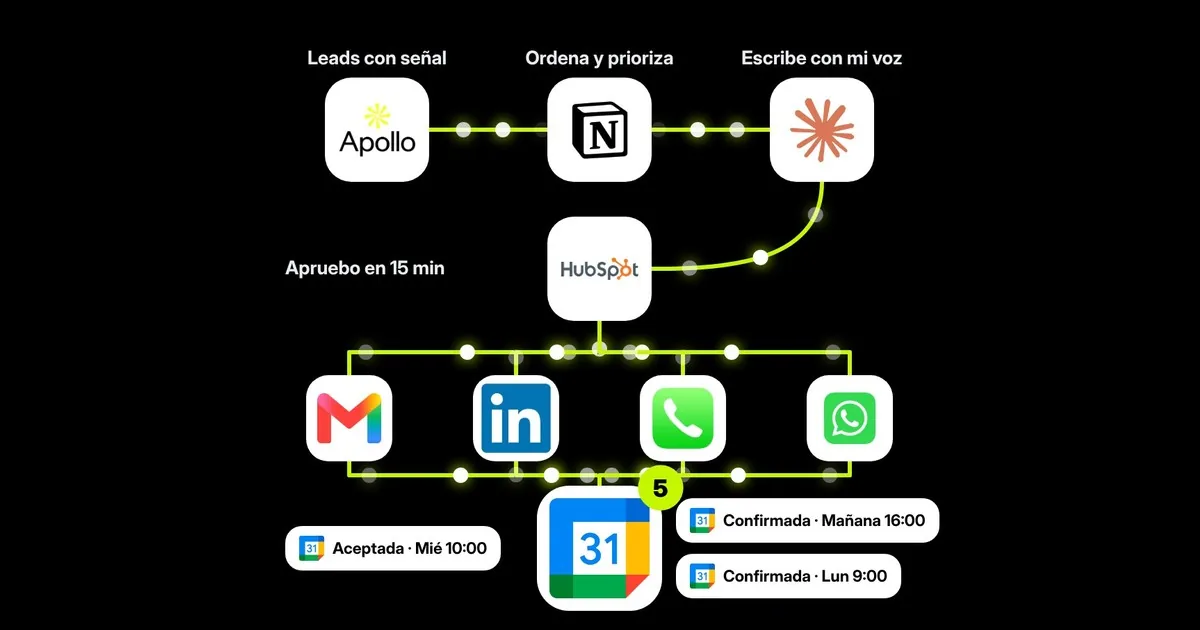
AI sales prospecting automation works when the heavy lifting happens overnight and a human approves what matters in the morning. That’s how I run it: a scheduled Claude task prioritizes my leads, looks for buying signals, writes every email in my voice and leaves it all ready in HubSpot. I spend 15 minutes on it with my coffee.
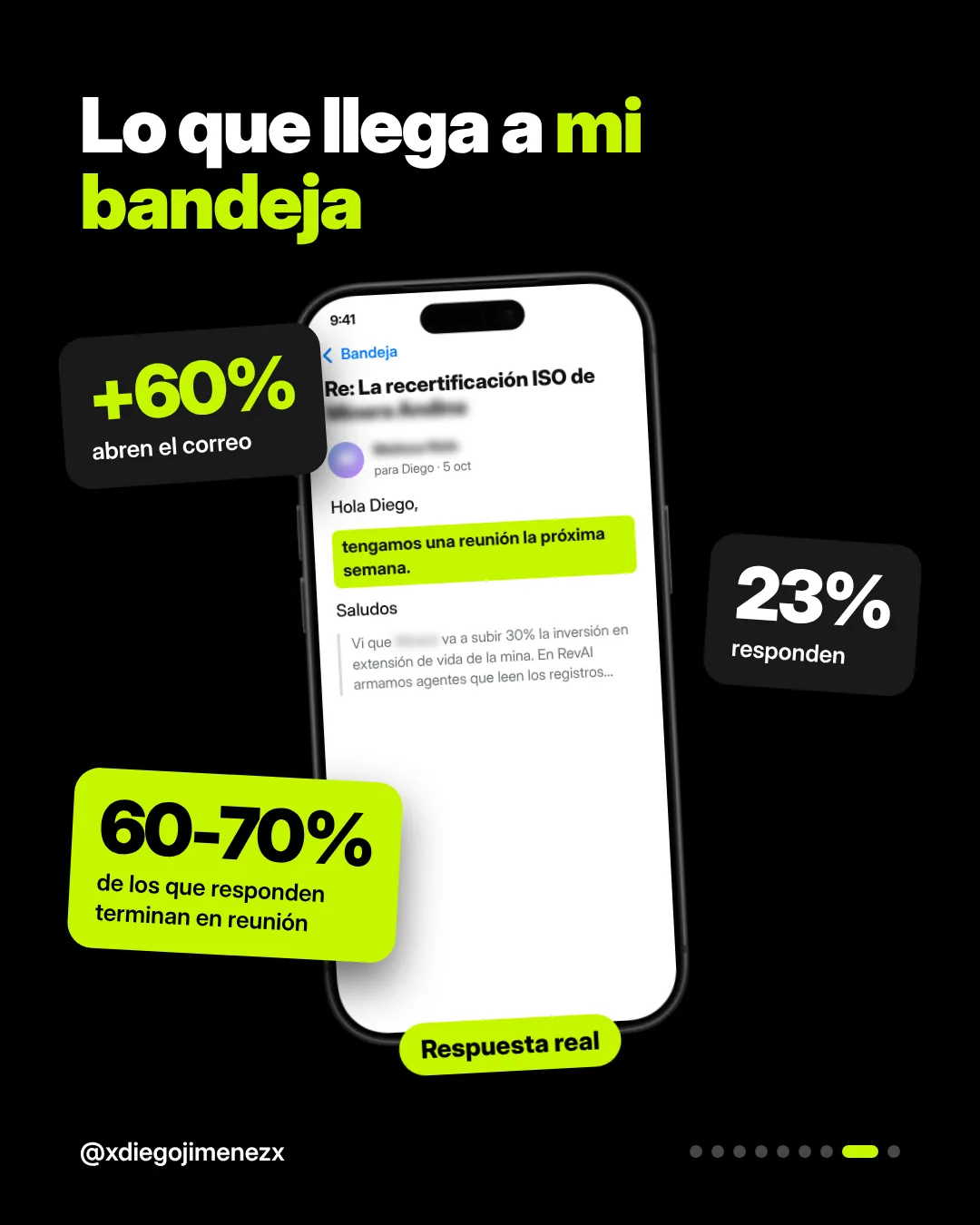
My weekly averages with this workflow: open rates above 60%, click rates between 10 and 15%, and a 23% reply rate. Of the people who reply, 60 to 70% end up booking a meeting after a short email exchange.
This is part two of my guide to LinkedIn prospecting for B2B. That post covers why your personal profile is the channel that converts best. This one shows how I keep the volume up when I’m not at my desk.
The whole workflow in 10 seconds
Five pieces talk to each other:
| Piece | Tool | What it does |
|---|---|---|
| Sourcing | Apollo | Filters accounts and contacts with buying signals |
| Brain | Notion | Sorts, prioritizes and stores my knowledge base |
| Writing | Claude | Researches and writes each email in my voice |
| Execution | HubSpot | Sequences, tasks and follow-up across channels |
| Outcome | Google Calendar | Where the meetings land |
Step 1: who I write to (and from where)
In Apollo I filter by title, industry, company size and region. But the filter that matters most is the signal: something that happened at the company that makes my message land at the right moment.
The signals I use most:
- They’re hiring SDRs or account executives.
- A new sales leader joined less than 90 days ago.
- They raised a round or announced expansion into a new market.
- Their team is researching topics like “AI for sales” (intent data).
- They recently bought a CRM and are still getting it in shape.
No signal, no spot on the list. I’d rather have 40 accounts with a reason than 400 without context.
The domain matters as much as the list. I never prospect from the company’s main email domain. I use a separate domain or subdomain just for outbound, something like hello.yourdomain.com, info.yourdomain.com or yourdomain-mail.com. If something goes wrong, the inbox your whole team relies on stays clean.
Apollo handles warm-up: it gradually builds the new mailbox’s reputation and ramps up volume so emails land in the inbox instead of spam. Google also requires bulk senders to authenticate their domain, offer one-click unsubscribe and keep spam rates under 0.3%, per its email sender guidelines.
Step 2: Notion is the brain, HubSpot stays clean
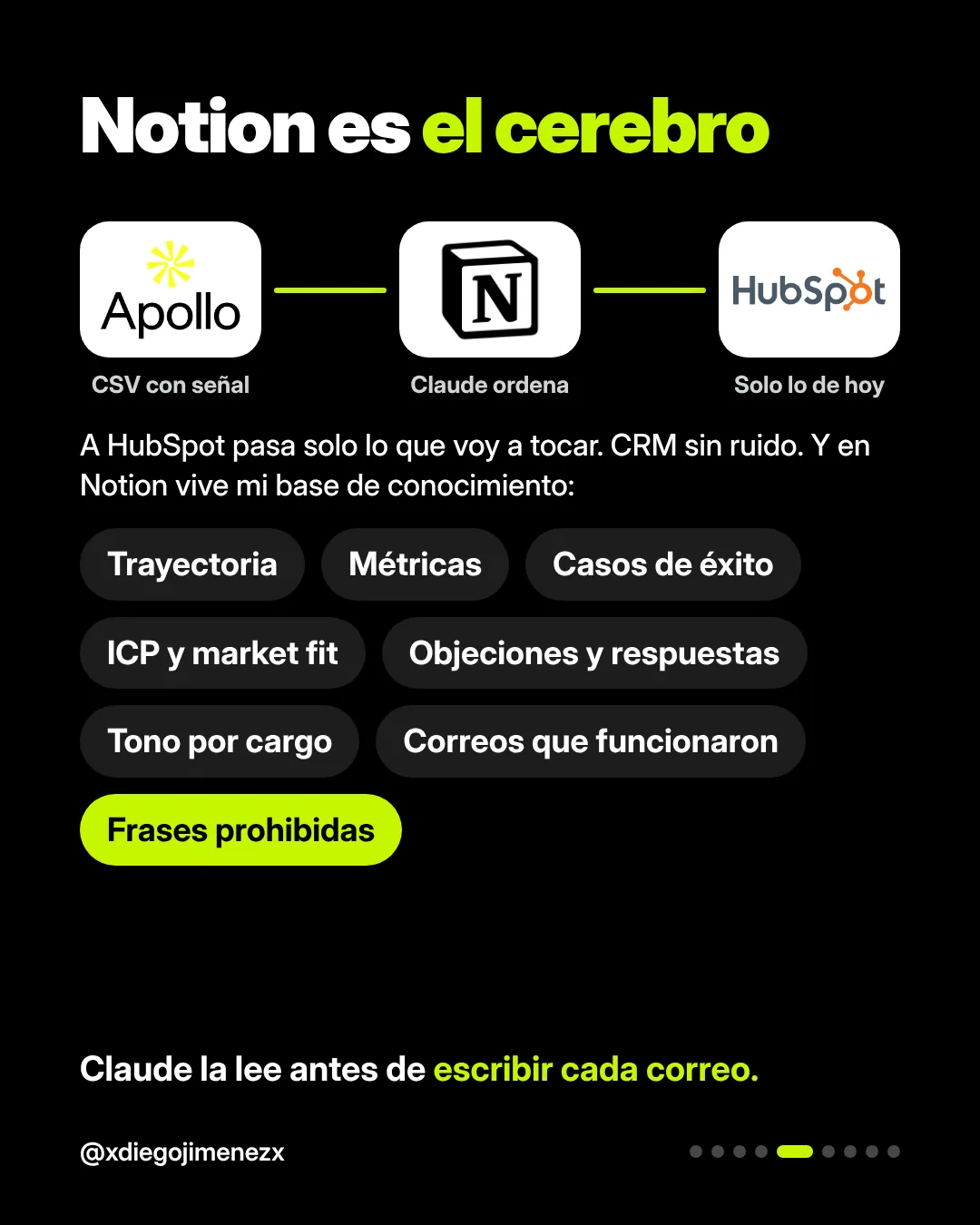
The Apollo export goes into Notion, not straight into the CRM. Claude categorizes it by fit and prioritizes it by signal. Only what I’m going to work that week moves to HubSpot.
I do it this way to keep things clean. A CRM full of contacts nobody will touch goes stale fast: reports stop being accurate, tasks get buried and the team stops trusting it. With this filter, HubSpot shows what matters today.
Notion also holds what makes the emails sound like me, my knowledge base:
- My background and stories I can tell.
- Metrics, results and case studies.
- Services, focus and market fit by industry.
- Common objections and how I answer them.
- Tone by the person’s role.
- Discovery questions.
- Emails that worked.
- Banned phrases: anything that sounds templated or machine-written.
Step 3: every night, Claude works on its own
A scheduled Claude task runs overnight, while I’m not using the credits. Each run does four things:
- Prioritizes the new leads that landed in Notion.
- Looks for fresh signals at each company.
- Reads the contact’s public posts and comments to understand what they care about.
- Writes the first email based on the company, the role and my knowledge base.
To write, it uses a voice skill I built myself: how I write, which words I never use, how I open and close an email. That’s the difference between an email that reads like someone did their homework on you and one that reads like a template.
Step 4: 15 minutes in HubSpot each morning
Claude can send the emails on its own. I prefer a hybrid model:
- Top accounts: I review the draft, edit what needs editing and send it.
- Everyone else: goes out automatically inside the sequence.
- Anyone who opens or clicks moves into my task list with a suggested next step: a call, a text, a voice note or a LinkedIn comment.
I could send everything straight from Apollo. I prefer working the tasks in HubSpot because that’s where I connect channels and see each account’s full sequence. Everyone has their own method; what matters is that follow-up doesn’t depend on your memory.
When Claude is missing context, it asks me. For example: “Do you know anyone at this account?” or “Do you have a mining case study to cite?” I answer in one line and the email gets better.
Does it scale? Fewer emails, written well
This is the question I hear most from sales leaders: if every email is this personalized, how does it grow?
It grows because the expensive work (research, prioritization, writing) happens overnight with AI, and the human part shrinks to making decisions. An SDR writing by hand can personalize maybe 20 emails a day. This workflow leaves me more than that every morning, and my time goes to the accounts that can actually close.
My weekly averages:
| Metric | Weekly average |
|---|---|
| Open rate | Above 60% |
| Click rate | 10 to 15% |
| Reply rate | 23% |
| Replies that turn into meetings | 60 to 70% |
A note on open rates: they’re the least reliable metric, because some email clients load images automatically and inflate them. I watch replies and meetings. Those don’t lie.
Claude learns from my edits
Every change I make to a draft goes into a learnings log in Notion. Which word I cut, which subject line got more opens, which day certain roles replied best. Claude uses that to tune the cadence and tone for the following week.
That log is what makes the system improve on its own. In week one you review more; by week four, almost everything goes out the way you’d have written it.
If you want something like this for your sales team, at RevAI we build custom AI agents around how your company actually sells. And if you’re still figuring out where to start, read why AI fails in sales when it’s rolled out wrong.
FAQ
Is it safe to send cold emails with AI?
Yes, if you get three things right: a domain separate from your main one, warm-up before ramping volume, and emails that are actually personalized. What burns domains is high volume with generic messages.
Can AI send the emails on its own?
It can. I approve the most important accounts and let the rest go out in the sequence. That balance gives you scale without risking the relationships you care about most.
Do I need all these tools to automate prospecting?
No. You need a lead source with signals, a place to sort and prioritize, a CRM to execute and an AI that writes with your context. The specific tools can change.
Where does LinkedIn fit in this workflow?
LinkedIn is one channel inside the sequence: comments, connection requests and messages. I keep that part manual, because that’s where the relationship matters most. I cover it in part one of this guide.
How long does it take to set up?
A baseline workflow can be up and running in a few weeks. What takes longer is building a good knowledge base, and that gets better with every week of use.
Want us to build it for your team? Let’s talk.